local/fabric-x-no-mtls.yaml
fabric-x-no-mtls.yaml is the local container sample with TLS enabled and mTLS disabled.
Use it when you need encrypted local traffic but want to remove client certificate authentication from Fabric-X service-to-service calls.
Warning
This inventory is meant for debugging only. It disables mTLS client authentication between Fabric-X services.
Network Diagram
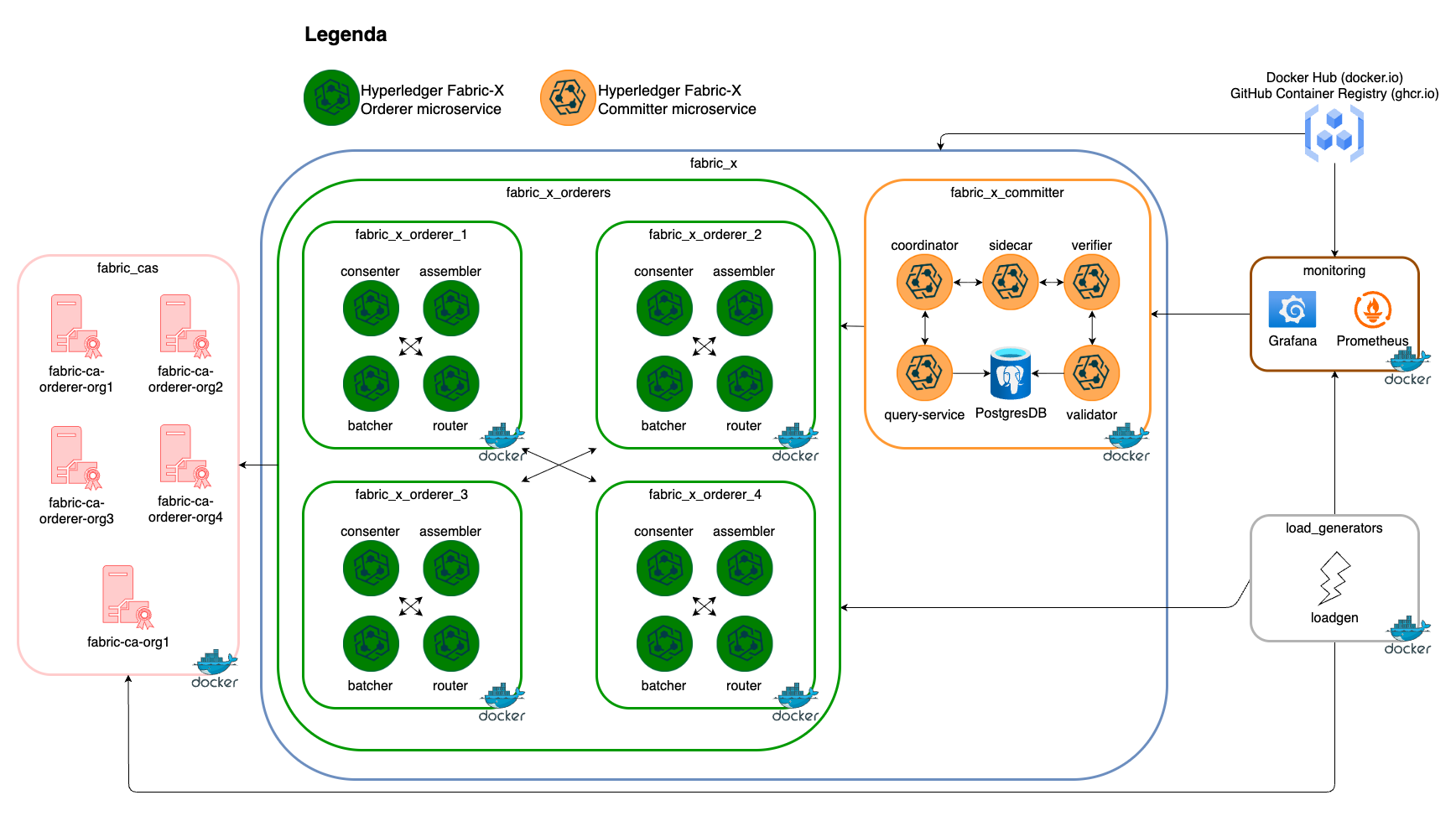
The diagram below summarizes this inventory's Fabric-X services and how they fit together.
Inventory Details
All long-running services run as local containers. Ansible connects locally and uses the same container runtime paths as fabric-x.yaml.
This inventory deploys the same service layout as the default local sample:
- 5 Fabric CA servers and 5 PostgreSQL databases for Fabric CA state.
- 4 orderer groups. Each group has 1 router, 1 consenter, 1 assembler, and 1 batcher.
- 1 committer with validator, verifier, coordinator, sidecar, query service, and PostgreSQL storage.
- 1 Block Explorer server and UI with PostgreSQL storage, streaming blocks from the committer sidecar.
- 1 load generator.
- Monitoring with node exporter, PostgreSQL exporter, cAdvisor, Prometheus, Grafana, Loki, and Alloy.
flowchart TD
  all --> network
  network --> fabric_cas
  network --> fabric_x
  all --> load_generators
  all --> monitoring
  monitoring --> prometheus
  monitoring --> grafana
  monitoring --> loki
  monitoring --> alloy
  monitoring --> node_exporter
  monitoring --> postgres_exporter
  monitoring --> cadvisor
  grafana --> prometheus
  grafana --> loki
  alloy --> loki
  prometheus --> node_exporter
  prometheus --> postgres_exporter
  prometheus --> cadvisor
  fabric_cas --> fabric_ca_servers
  fabric_cas --> fabric_ca_dbs
  fabric_x --> fabric_x_orderers
  fabric_x --> fabric_x_committers
  fabric_x --> fabric_x_block_explorer
  fabric_x_committers --> fabric_x_committer
  fabric_x_orderers --> fabric_x_orderer_1
  fabric_x_orderers --> fabric_x_orderer_2
  fabric_x_orderers --> fabric_x_orderer_3
  fabric_x_orderers --> fabric_x_orderer_4
TLS remains enabled for Fabric CA, PostgreSQL, orderer, committer, load generator, and monitoring components that declare TLS variables. The orderer_use_mtls and committer_use_mtls variables are omitted, so Fabric-X services do not require client certificates from each other.
This is useful for isolating TLS certificate, hostname, or endpoint problems from mTLS client-authentication problems.