local/fabric-x.yaml
fabric-x.yaml is the default local sample inventory. It runs a complete Fabric-X network on one machine with containers, Fabric CA enrollment, PostgreSQL, TLS, and mTLS.
Use this inventory first when you want the most representative single-machine deployment.
Network Diagram
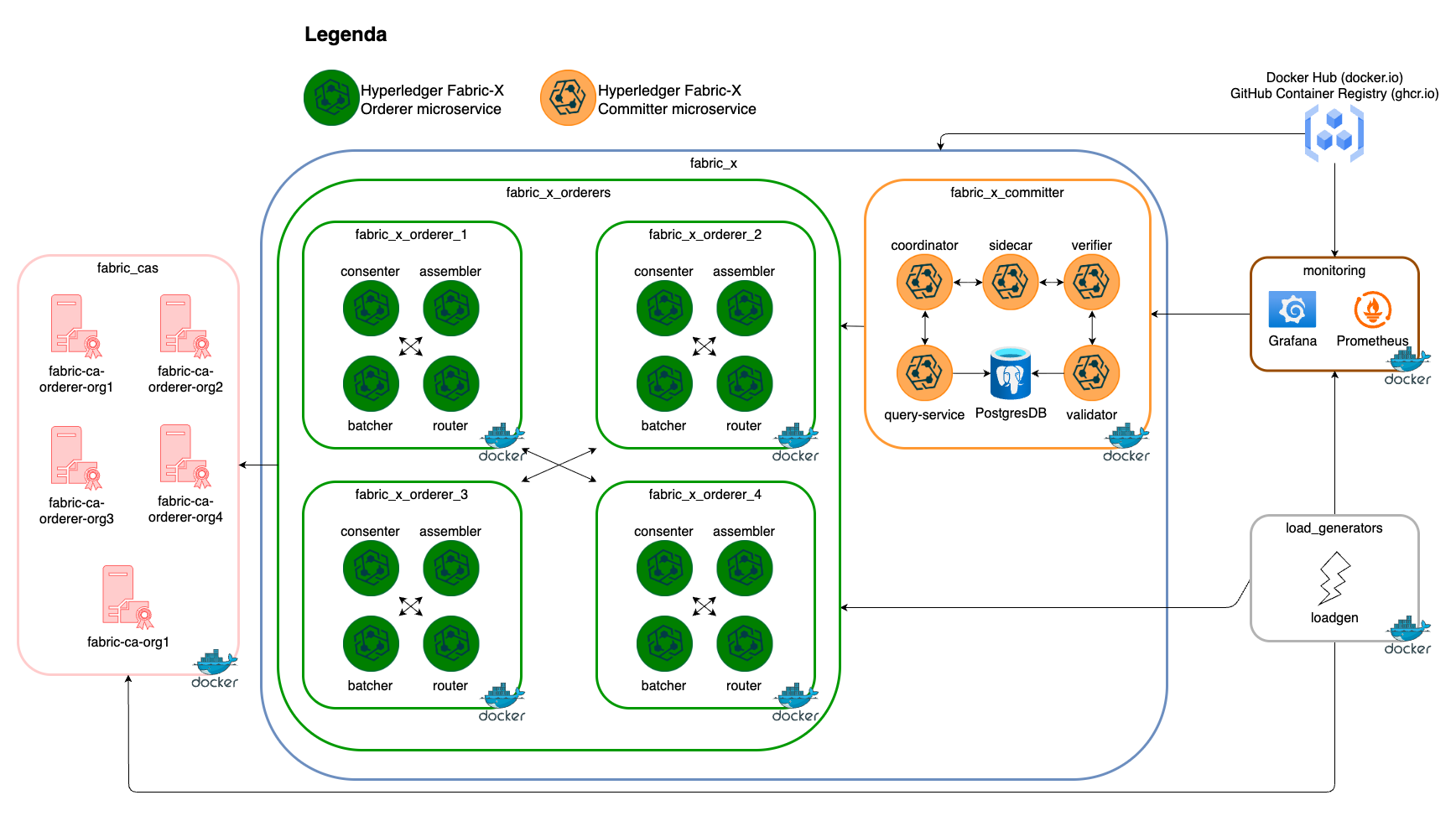
The diagram below summarizes this inventory's Fabric-X services and how they fit together.
Inventory Details
All long-running infrastructure services and the load generator run as containers. Ansible connects locally through the environment in local/group_vars/all/env.yaml, and deployment state is written below the configured output directory.
This inventory deploys these logical services on the local machine:
- 5 Fabric CA servers and 5 PostgreSQL databases for Fabric CA state.
- 4 orderer groups. Each group has 1 router, 1 consenter, 1 assembler, and 1 batcher.
- 1 committer with validator, verifier, coordinator, sidecar, query service, and PostgreSQL storage.
- 1 Block Explorer server and UI with PostgreSQL storage, streaming blocks from the committer sidecar.
- 1 load generator.
- Monitoring with node exporter, PostgreSQL exporter, cAdvisor, Prometheus, Grafana, Loki, and Alloy.
flowchart TD
  all --> network
  network --> fabric_cas
  network --> fabric_x
  all --> load_generators
  all --> monitoring
  monitoring --> prometheus
  monitoring --> grafana
  monitoring --> loki
  monitoring --> alloy
  monitoring --> node_exporter
  monitoring --> postgres_exporter
  monitoring --> cadvisor
  grafana --> prometheus
  grafana --> loki
  alloy --> loki
  prometheus --> node_exporter
  prometheus --> postgres_exporter
  prometheus --> cadvisor
  fabric_cas --> fabric_ca_servers
  fabric_cas --> fabric_ca_dbs
  fabric_x --> fabric_x_orderers
  fabric_x --> fabric_x_committers
  fabric_x --> fabric_x_block_explorer
  fabric_x_committers --> fabric_x_committer
  fabric_x_orderers --> fabric_x_orderer_1
  fabric_x_orderers --> fabric_x_orderer_2
  fabric_x_orderers --> fabric_x_orderer_3
  fabric_x_orderers --> fabric_x_orderer_4
This is the baseline local topology. Fabric CA issues identities for the orderer organizations and Org1. Fabric-X services use TLS and mTLS, while Fabric CA, PostgreSQL, load generator, and monitoring traffic use TLS where supported.
The committer validator and query service use the PostgreSQL host committer-db. The Block Explorer (server and UI combined in a single container on the block-explorer host) streams blocks from committer-sidecar (named by sidecar_host) and stores them on its own PostgreSQL host block-explorer-db.