openshift/fabric-x-cryptogen.yaml
fabric-x-cryptogen.yaml deploys the OpenShift sample without Fabric CA services. Crypto material is generated on the control node with cryptogen.
Use it for repeatable OpenShift tests that should not exercise Fabric CA enrollment or Kubernetes NodePort exposure.
Warning
This inventory is intended for debugging and repeatable test runs. For production-style deployments, start from a Fabric CA based inventory instead.
Network Diagram
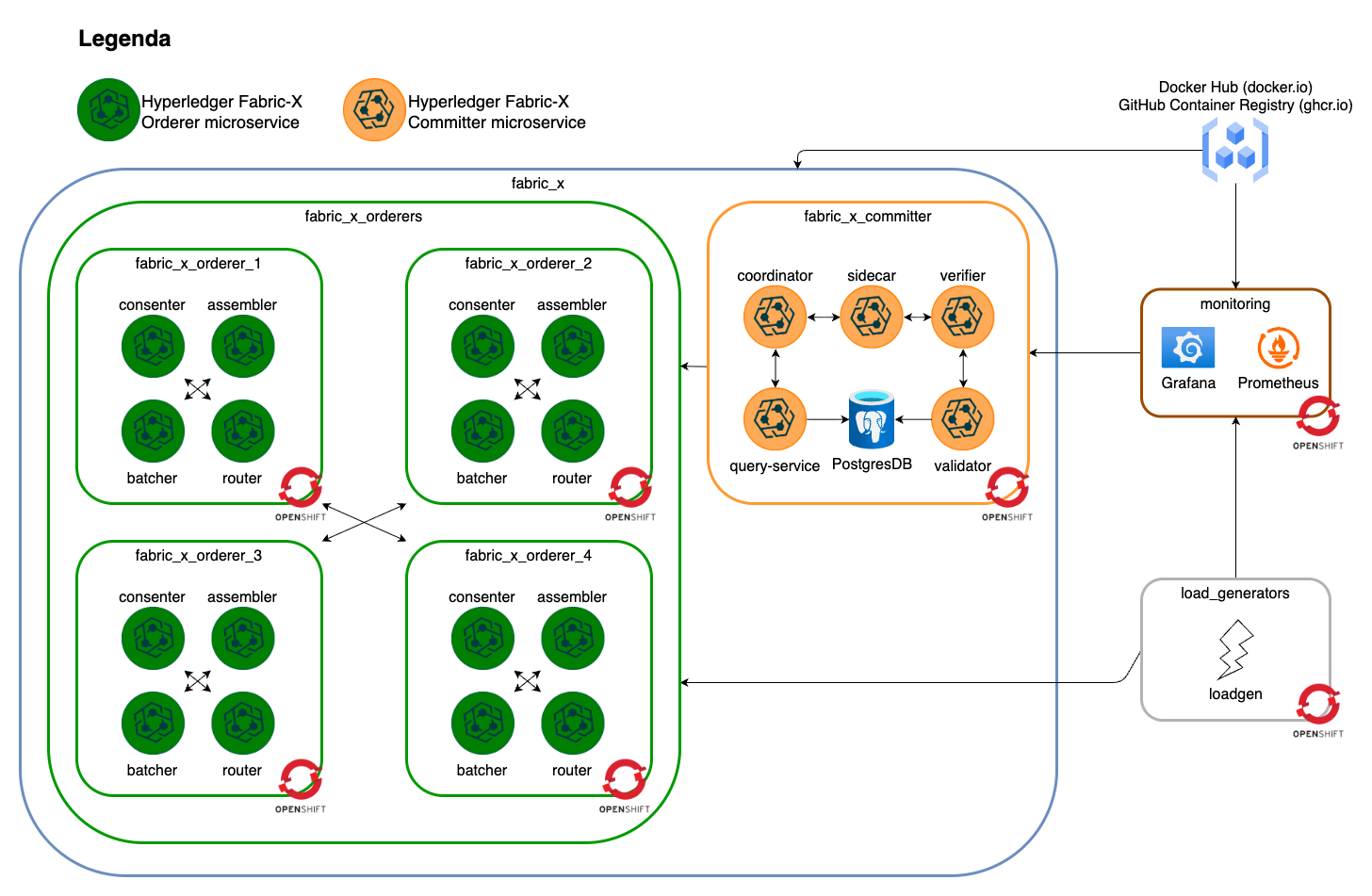
The diagram below summarizes this inventory's Fabric-X services and how they fit together.
Inventory Details
Orderer, committer, PostgreSQL, load generator, node exporter, Prometheus, Grafana, Loki, and Alloy use OpenShift task paths. cryptogen runs on the control node and writes artifacts below cryptogen_artifacts_dir.
This inventory deploys these logical services as OpenShift workloads, services, and routes:
- No Fabric CA servers or Fabric CA databases.
- 4 orderer groups. Each group has 1 router, 1 consenter, 1 assembler, and 1 batcher.
- 1 committer with validator, verifier, coordinator, sidecar, query service, and PostgreSQL storage.
- 1 Block Explorer server and UI with PostgreSQL storage, streaming blocks from the committer sidecar and exposed through an OpenShift Route.
- 1 load generator.
- Monitoring with node exporter, PostgreSQL exporter, Prometheus, Grafana, Loki, and Alloy.
Note
If OpenShift routes map to 127.0.0.1, binary CLIs can still work, but containerized binaries may fail because 127.0.0.1 is resolved inside the container network namespace. Run make oc-config-hosts (requires sudo) to setup the routes in /etc/hosts before starting Fabric-X.
flowchart TD
  all --> network
  network --> fabric_x
  all --> load_generators
  all --> monitoring
  monitoring --> prometheus
  monitoring --> grafana
  monitoring --> loki
  monitoring --> alloy
  monitoring --> node_exporter
  monitoring --> postgres_exporter
  grafana --> prometheus
  grafana --> loki
  alloy --> loki
  prometheus --> node_exporter
  prometheus --> postgres_exporter
  fabric_x --> fabric_x_orderers
  fabric_x --> fabric_x_committers
  fabric_x --> fabric_x_block_explorer
  fabric_x_committers --> fabric_x_committer
  fabric_x_orderers --> fabric_x_orderer_1
  fabric_x_orderers --> fabric_x_orderer_2
  fabric_x_orderers --> fabric_x_orderer_3
  fabric_x_orderers --> fabric_x_orderer_4
Fabric CA is omitted entirely. Certificates and keys are generated centrally before OpenShift-backed component configuration consumes them.