local/fabric-x-vault.yaml
fabric-x-vault.yaml is the same topology as fabric-x.yaml — same hosts, same ports, same groups — with every credential encrypted using Ansible Vault instead of stored as plain text.
Use this inventory as a reference for a secured deployment strategy, or as a starting point for encrypting the credentials of your own inventory. See 12. Using Ansible Vault for Secrets for how to configure, view, and edit it.
Network Diagram
This inventory is topologically identical to fabric-x.yaml; the diagram below summarizes its Fabric-X services and how they fit together.
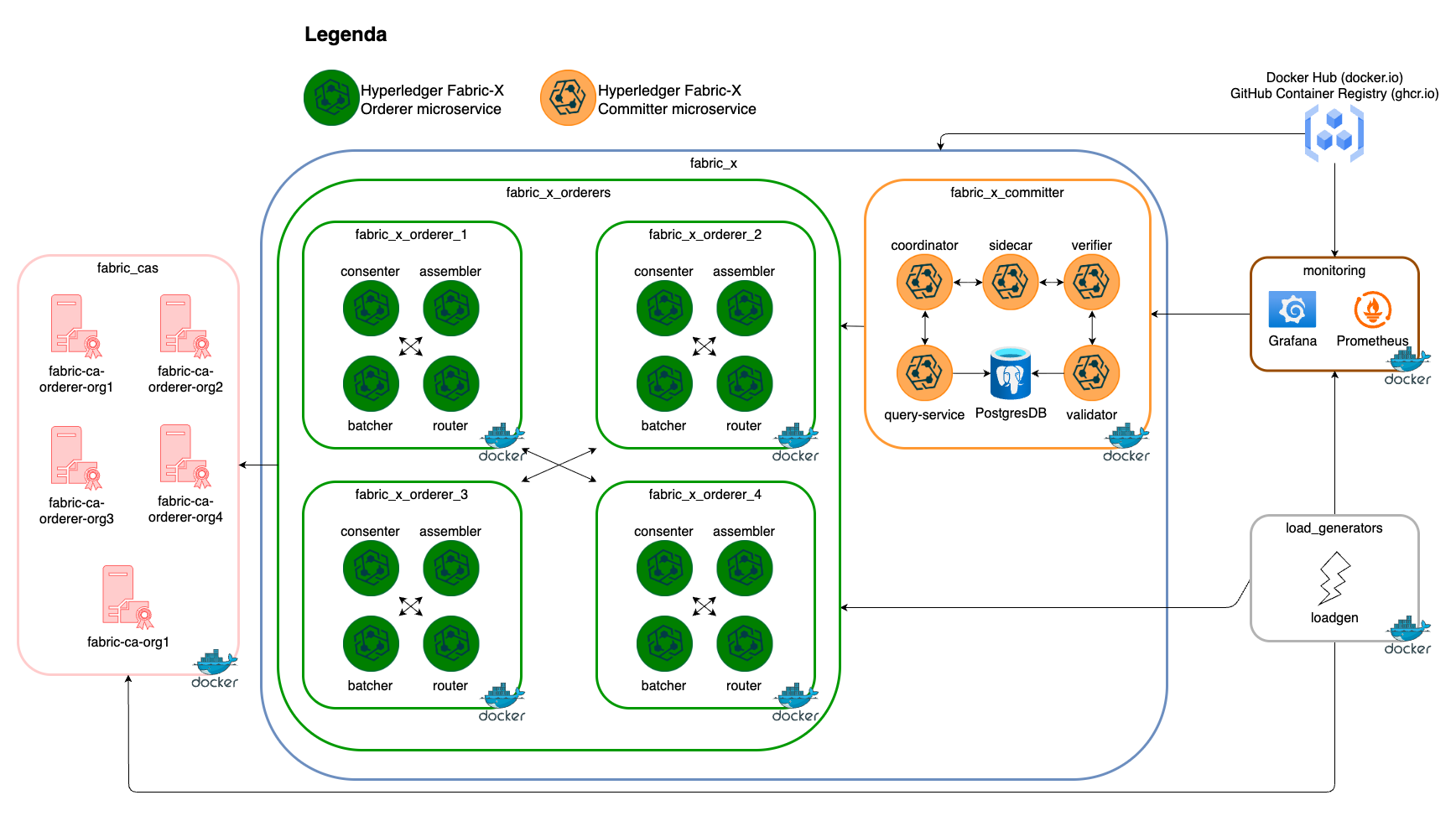
What Is Vaulted
Every credential is replaced with an !vault | encrypted block, or, for the per-host Fabric CA enrollment secrets, with a Jinja expression referencing a single Vault-encrypted variable shared across hosts:
| Variable | Where |
|---|---|
postgres_password |
Fabric CA databases, the committer database, the Block Explorer database |
fabric_ca_admin.secret |
Every Fabric CA server |
grafana_password |
The Grafana host |
vault_identity_secret_suffix |
Referenced by every orderer, committer, and load generator enrollment secret (all.vars) |
Every one of these is also written as a # decrypted value: ... comment directly above its encrypted block in fabric-x-vault.yaml, so you can read the plaintext straight out of the file. This inventory exists purely to demonstrate the mechanism, so there is nothing in it worth protecting from a reader — do not carry that habit into an inventory holding real credentials.
Viewing Decrypted Values
ansible-vault view only works on a file that is encrypted as a whole — it fails here, because every secret is encrypted in place with an inline !vault block and the rest of the file is plain YAML. Ansible only decrypts an inline value at the moment a task or template actually reads it, so seeing the plaintext through a command (rather than the inline comments above) means asking Ansible to read it:
export ANSIBLE_INVENTORY=examples/inventory/local/fabric-x-vault.yaml
make vault-view TARGET_HOSTS=fca-orderer-org1-db
This runs examples/playbooks/998-vault-view.yaml, which prints every variable for the targeted host or group, decrypted (default TARGET_HOSTS=all prints the entire inventory; pass VAULT_VAR_NAME=<name> to print just one variable, the same way vault-encrypt names one below). It requires ANSIBLE_VAULT_PASSWORD_FILE to already be exported — see Running It below.
Generating a New Vault-Encrypted Value
To rotate a credential, or to Vault-protect a value in an inventory of your own, encrypt it with:
Type the value, then press Enter followed by Ctrl-D. It is read from stdin — not typed as a command-line argument, so it never lands in shell history — and prints a ready-to-paste block:
Paste it in place of the plaintext value at the same indentation as the key it replaces. It encrypts under whichever file ANSIBLE_VAULT_PASSWORD_FILE currently points at (see Running It below), so set .vault_pass to the password you actually intend to encrypt under before running this, not after.
Tip
Encrypting the same plaintext twice produces different ciphertext each time — a random salt is mixed in on every call. That is expected; both blocks decrypt to the same value.
Running It
The password used to encrypt this inventory is fabricx-vault-demo, documented here so the reference is actually runnable — every plaintext value it protects is already public in fabric-x.yaml, so this is a worked example of the mechanism, not a real secret boundary:
echo -n 'fabricx-vault-demo' > .vault_pass
export ANSIBLE_VAULT_PASSWORD_FILE="$PWD/.vault_pass"
export ANSIBLE_INVENTORY=examples/inventory/local/fabric-x-vault.yaml
make setup start init
ANSIBLE_VAULT_PASSWORD_FILE is a native Ansible environment variable — nothing in examples/ansible.cfg references it, and no --vault-password-file or --ask-vault-pass flag is needed on any command, including the make targets, once it is exported. It is session-wide, though: every Ansible command run afterward, against any inventory, tries to use .vault_pass and fails immediately if it is missing. Clean up when you are done:
.vault_pass is gitignored and must never be committed.
Inventory Details
See fabric-x.yaml's inventory details — the deployed services, their organization, and their security posture are unchanged. The only difference is how credentials are stored, not what they are or how the network behaves.